

A sales forecast is useful only when it helps you make a decision. For a small product-based business, that usually means two questions: how much might I sell next, and do I have enough stock to support those sales?
This free Excel sales forecast template answers both in one workbook. You enter recent unit sales, current stock, supplier lead time, safety stock, and a simple growth adjustment. The workbook then creates a three-month sales forecast, estimates forecast revenue, calculates a reorder point, and suggests an order quantity.
Free Excel template
Download the Sales Forecast Template
Forecast three months of unit sales, estimate revenue, review reorder points, and plan suggested order quantities in one Excel workbook.
Download Excel TemplateDownload Excel
Copy Google Sheets TemplateCopy in Google Sheets
Google Sheets may ask you to sign in before making your copy.
Excel is the primary version for A16. Replace the sample data before using the workbook for real purchasing decisions.
Quick start: forecast one product
- In Product Setup, replace one sample product with its price, current stock, supplier lead time, and safety stock. Start with a 0% Growth Adjustment unless you have a reason to change it.
- In Sales History, enter six complete months of units sold for that same product row. Use units rather than sales revenue.
- Review Forecast & Inventory, then compare the forecast and suggested order with known promotions, seasonality, stockouts, and supplier conditions.
The three-month forecast is a planning estimate. Review the assumptions before placing a purchase order.
What This Excel Sales Forecast Template Includes
The workbook is intentionally small. It has five sheets:
- Instructions — explains the method, workflow, color key, and limitations.
- Product Setup — stores product name, selling price, unit cost, current stock, lead time, safety stock, and growth adjustment.
- Sales History — stores the six most recent complete months of unit sales.
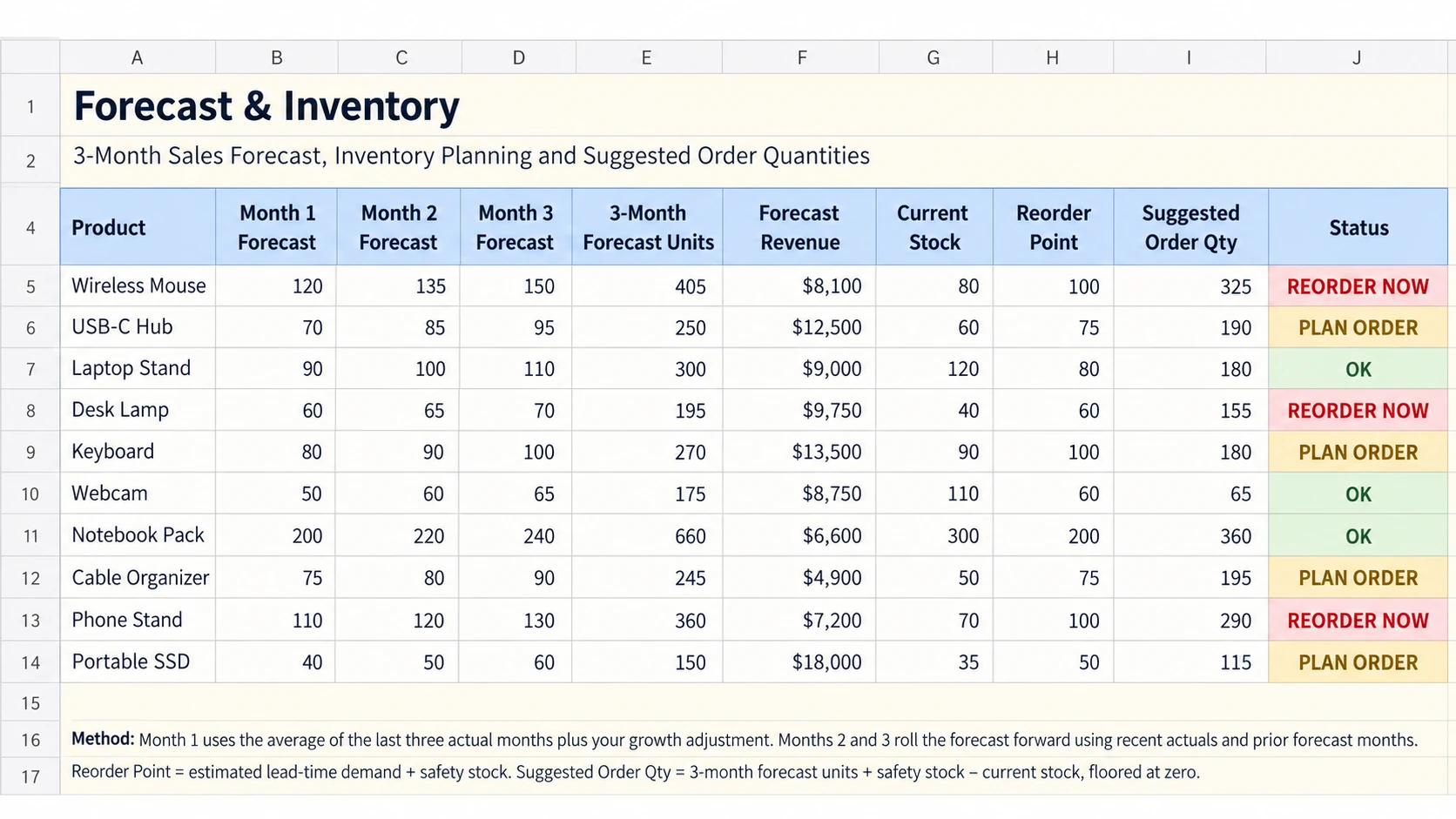
- Forecast & Inventory — calculates the next three months of forecast units, forecast revenue, reorder point, projected ending stock, suggested order quantity, and status.
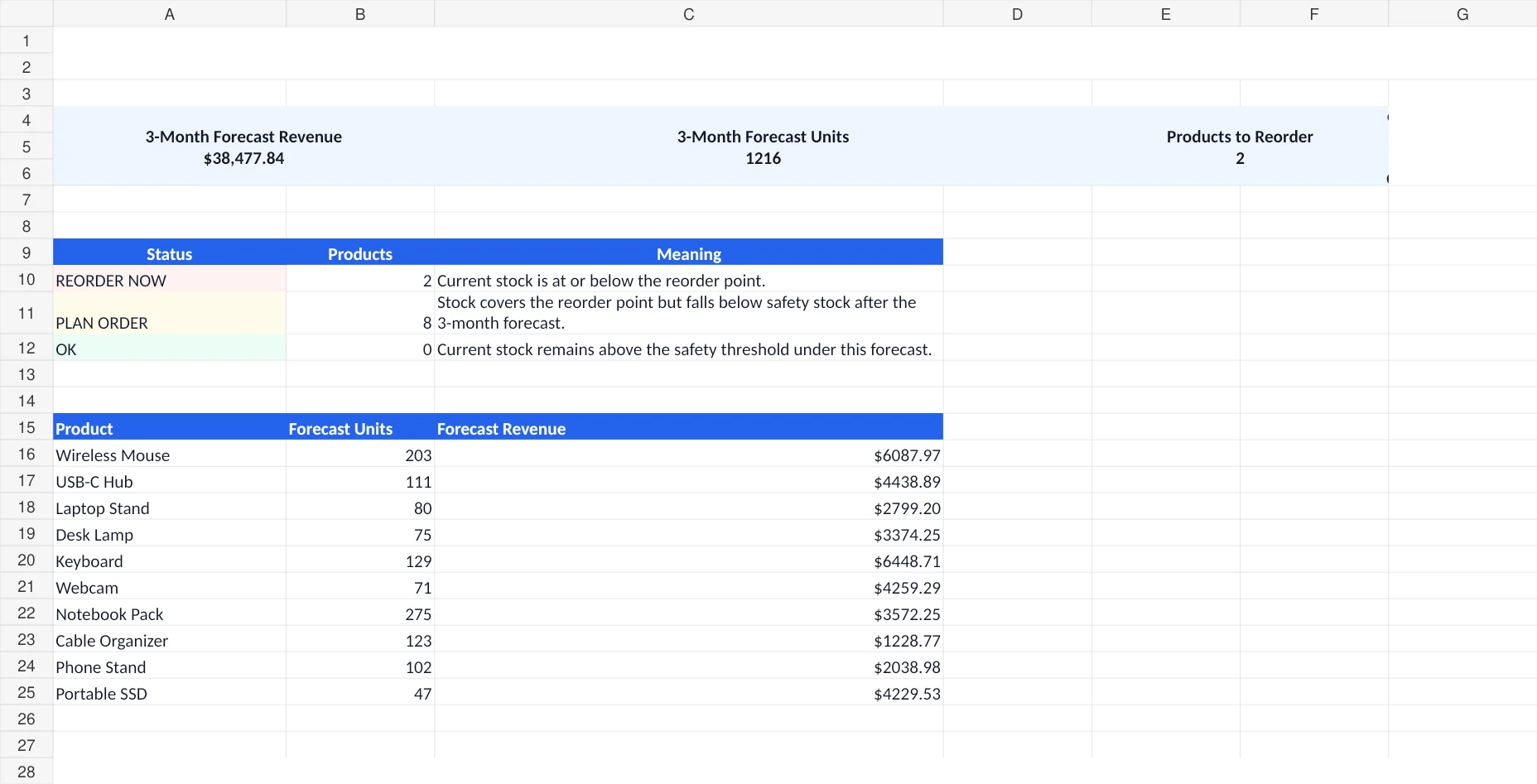
- Dashboard — summarizes forecast revenue, forecast units, products that need immediate reorder attention, and estimated order cost.
The sample workbook contains ten example products so you can see the logic before replacing them with your own data.
How the Sales Forecast Works
This template uses a simple rolling method rather than pretending to predict sales with advanced machine learning.
Month 1 starts with the average of the last three actual months. The workbook then applies the Growth Adjustment from Product Setup. Month 2 rolls forward using the two most recent actual months plus Month 1. Month 3 rolls forward again using the most recent actual month plus the first two forecast months.
That makes the forecast easy to audit. You can trace every forecast number back to recent sales and one visible assumption.
| Output | How it is calculated | Why it matters |
|---|---|---|
| Forecast Month 1 | Average of the last three actual months, adjusted by expected growth | Creates the first short-term estimate |
| Forecast Months 2–3 | Rolling average using recent actuals and earlier forecast months | Extends the plan without using a flat number |
| Forecast Revenue | Three-month forecast units × selling price | Connects unit demand to expected sales value |
| Reorder Point | Estimated lead-time demand + safety stock | Shows when current stock is getting too close to replenishment risk |
| Suggested Order Qty | Three-month forecast + safety stock − current stock, floored at zero | Turns the forecast into a starting purchasing quantity |
This is a planning model, not a guarantee. Promotions, stockouts, seasonality, supplier problems, new products, and sudden demand changes can make a simple moving-average forecast less reliable.
How to Use the Template Step by Step
1. Replace the sample products
Open Product Setup first. For each product, enter the selling price, unit cost, current stock, supplier lead time, safety stock, and growth adjustment.
The Growth Adjustment is optional. Use 0% when you do not have a strong reason to change the recent sales pattern. A positive percentage raises the forecast. A negative percentage lowers it.
2. Enter six complete months of unit sales
Go to Sales History and replace the sample values with your six most recent complete months. Keep each product on the same row as Product Setup. If you still need a simple place to record current opportunities before they become historical sales, use the Google Sheets sales tracker for pipeline activity and keep this workbook focused on forecasting completed sales.
Use units sold, not sales revenue, because the inventory calculations need product quantities.
3. Review the three-month forecast
Open Forecast & Inventory. The workbook calculates the average of the last three months, applies the growth adjustment, creates three forecast months, totals the forecast units, and estimates forecast revenue.
4. Check the reorder status
The Status column separates products into three planning states:
- REORDER NOW — current stock is at or below the calculated reorder point.
- PLAN ORDER — stock is above the reorder point today, but projected ending stock falls below safety stock during the forecast window.
- OK — current stock remains above the safety threshold under the current forecast.
Do not treat these labels as automatic purchase approvals. Review supplier minimums, cash flow, storage limits, promotions, seasonality, and other real business conditions before placing an order.
5. Use the dashboard for a quick review
The Dashboard gives you the totals first, then shows each product’s forecast units and forecast revenue. Use it as the starting point, then open Forecast & Inventory for the product-level detail.
Sales Forecast Example From the Workbook
The sample Wireless Mouse has recent monthly sales of 58, 62, and 66 units. Their average is 62 units. With a 5% growth adjustment, Month 1 becomes 65 units. The rolling method then produces 68 units for Month 2 and 70 units for Month 3.
That gives a three-month forecast of 203 units. At a sample selling price of $29.99, the workbook calculates $6,087.97 in forecast revenue.
The same row also uses the current stock, lead time, and safety stock to calculate a reorder point and suggested order quantity. This is the main difference between a basic sales forecast sheet and this workbook: the forecast continues into an inventory action.
How Inventory Forecasting Fits Without Replacing Your Inventory Tracker
This workbook is not designed to replace your day-to-day inventory records. It does not record every stock-in and stock-out transaction.
If you need to maintain current quantities, suppliers, stock movements, low-stock alerts, and inventory value, use the existing Excel Inventory Template for Small Business.
A practical setup is to keep your current inventory system as the record of what you have now, then use this forecast workbook periodically to answer what you may need next.
When a reorder is approved, the purchase order template can help you prepare and track the supplier order separately.
When a Simple Excel Forecast Is Enough
This workbook is a good fit when you have a manageable product list, at least a few months of sales history, one main person reviewing the forecast, and purchasing decisions that still benefit from manual review.
You should consider dedicated demand-planning or inventory software when you need many locations, thousands of SKUs, automatic ecommerce integrations, purchase automation, complex seasonality models, service-level optimization, or several people making real-time planning changes.
Common Sales Forecast Spreadsheet Mistakes
Forecasting from revenue instead of units
If your goal includes inventory planning, forecast units first. Revenue alone does not tell you how many products need to be available.
Using incomplete current-month data
A half-finished month can make recent demand look weaker than it is. Use complete periods when possible.
Adding growth without evidence
The growth adjustment is visible for a reason. Keep it at 0% unless you have a practical reason to expect a change, such as a confirmed promotion, new distribution channel, or known slowdown.
Ignoring stockouts in historical sales
If a product was unavailable for part of a month, recorded sales may understate real demand. Make a note before relying on the average.
Treating the suggested order quantity as an automatic order
The suggested quantity is a starting point based on the workbook inputs. Supplier pack sizes, minimum order quantities, available cash, shelf space, seasonality, and planned promotions still matter.
What I Checked Before Finalizing the Workbook
The final workbook was checked against the sample calculations row by row. The forecast months, three-month totals, forecast revenue, average daily demand, lead-time demand, reorder point, projected ending stock, suggested order quantity, and status logic matched independent calculations for all ten sample products.
The workbook totals also reconcile to the Dashboard sample values: 1,216 forecast units, $38,477.84 forecast revenue, 2 products at REORDER NOW, and $14,353.00 estimated suggested order cost.
I also scanned the final workbook for common spreadsheet errors including #REF!, #DIV/0!, #VALUE!, #NAME?, and #N/A. The final scan returned no matches.
One robustness improvement was added during customer-style QA: clearing the sample sales history before entering your own data no longer creates a divide-by-zero average, and forecast units are prevented from becoming negative if an unrealistic adjustment below -100% is entered.
Download the Free Excel Sales Forecast Template
Use the workbook when you want a simple way to turn recent sales into a short-term forecast and connect that forecast to inventory planning.
Free Sales Forecast Template for Excel
Enter your recent unit sales and stock assumptions, then review the three-month forecast, reorder point, and suggested order quantity.
Google Sheets may ask you to sign in before making your copy.
If you need a forecast or inventory workbook adapted to your own product structure, supplier rules, or reporting process, see Simple Office AI spreadsheet services or contact Simple Office AI.
Frequently Asked Questions
What is a sales forecast template?
A sales forecast template is a structured spreadsheet used to estimate future sales from historical data and assumptions. This workbook forecasts unit sales for three months and also calculates forecast revenue.
Can I forecast inventory in Excel with this template?
Yes, for simple planning. The workbook uses forecast demand, supplier lead time, safety stock, and current stock to calculate a reorder point, projected ending stock, and suggested order quantity. It is not a full inventory-management system.
How many months of sales history do I need?
The workbook is prepared for six complete months of historical unit sales. The forecast itself gives more weight to the three most recent months through the rolling-average method.
Does the template predict seasonality?
No. It uses a simple rolling average plus a manual growth adjustment. If your sales change sharply by season, promotion, or event, review those effects separately instead of assuming the moving average will capture them.
Does the suggested order quantity guarantee I will not run out of stock?
No. It is a planning estimate based on the values you enter. Real demand, delivery delays, stock errors, supplier constraints, and other changes can still cause a stockout.
Written for Simple Office AI by El Hassan Arkhis. This workbook is a planning tool and does not replace accounting, financial, procurement, or professional business advice.