

A sales tracker is useful when you need to know more than who your customers are. You also need to see which opportunities are still open, how much they are worth, when they may close, and how much revenue you have actually won.
This free Google Sheets sales tracker is built for freelancers, small service businesses, and small teams that want a simple sales pipeline without setting up a full CRM. You can record each opportunity once, move it through six sales stages, and use the dashboard to monitor pipeline value, weighted value, won revenue, open deals, and win rate.
What this sales tracker helps you track
The template keeps the sales process focused on opportunities and revenue. It is not a general contact database. For each deal, you can record the customer, product or service, sales owner, stage, deal value, probability, dates, source, and notes.
- Lead
- Qualified
- Proposal Sent
- Negotiation
- Won
- Lost
Open opportunities are the first four stages. Won and Lost close the opportunity. This makes it easier to separate potential revenue from completed sales.
How the Google Sheets sales tracker works
The workbook has four sheets: START HERE, SALES DATA, SALES PIPELINE, and DASHBOARD. You enter and update deals in SALES DATA. The pipeline and dashboard use that data for their summaries.
1. Add each opportunity to Sales Data
SALES DATA is the main input sheet. Each row represents one sales opportunity. The fields include Deal ID, Deal / Opportunity, Customer / Company, Product / Service, Sales Owner, Sales Stage, Deal Value, Probability, Weighted Value, Date Added, Expected Close Date, Actual Close Date, Source, and Notes.
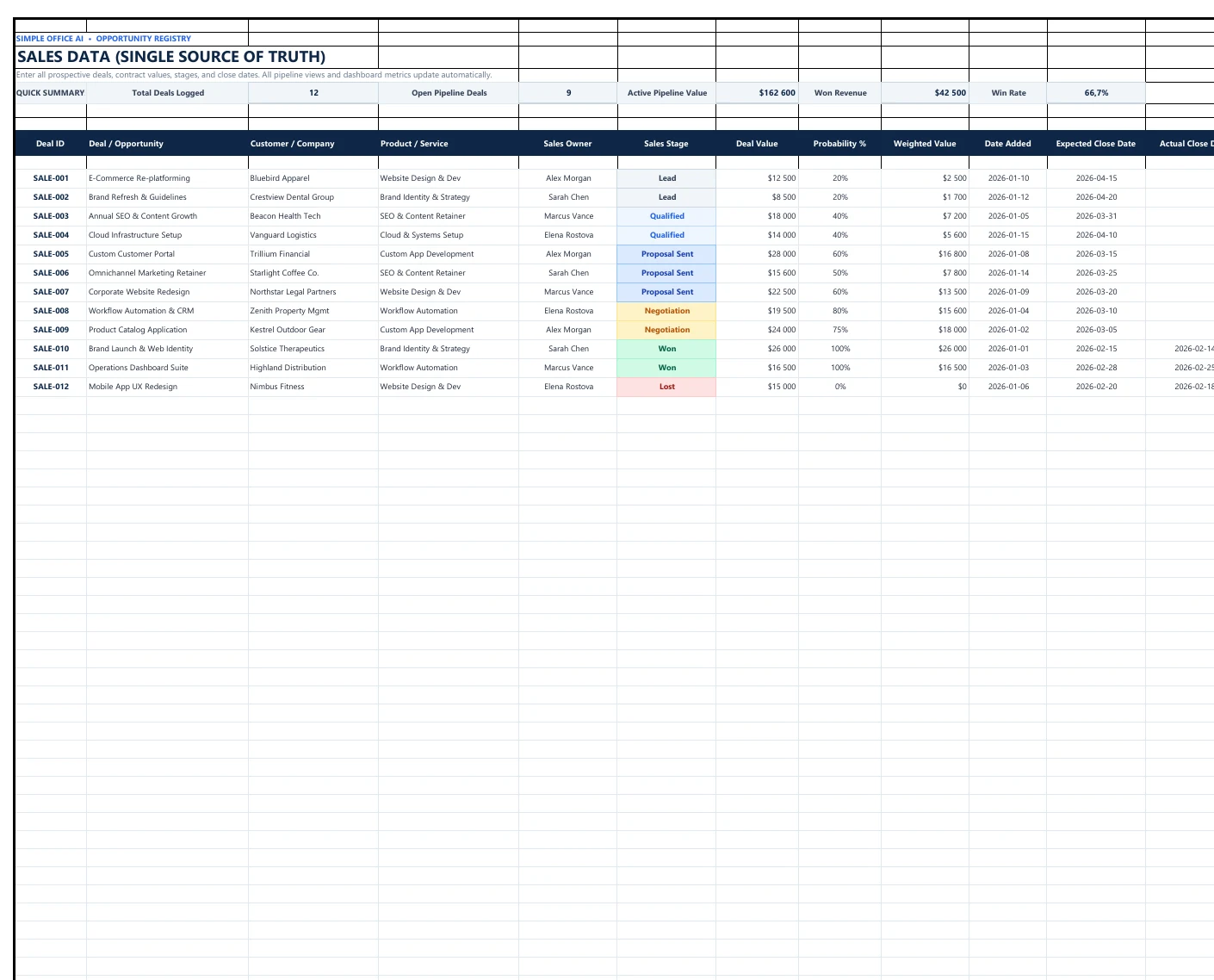
Stage and source fields use dropdowns to keep entries consistent. Stage colors make it easier to scan the table. Weighted Value is calculated from Deal Value × Probability, so you do not need to calculate it manually for each opportunity.
2. Review the sales pipeline
SALES PIPELINE groups the same opportunities by stage. Each section shows the deals currently sitting at that point in the process, together with a deal count and total stage value.
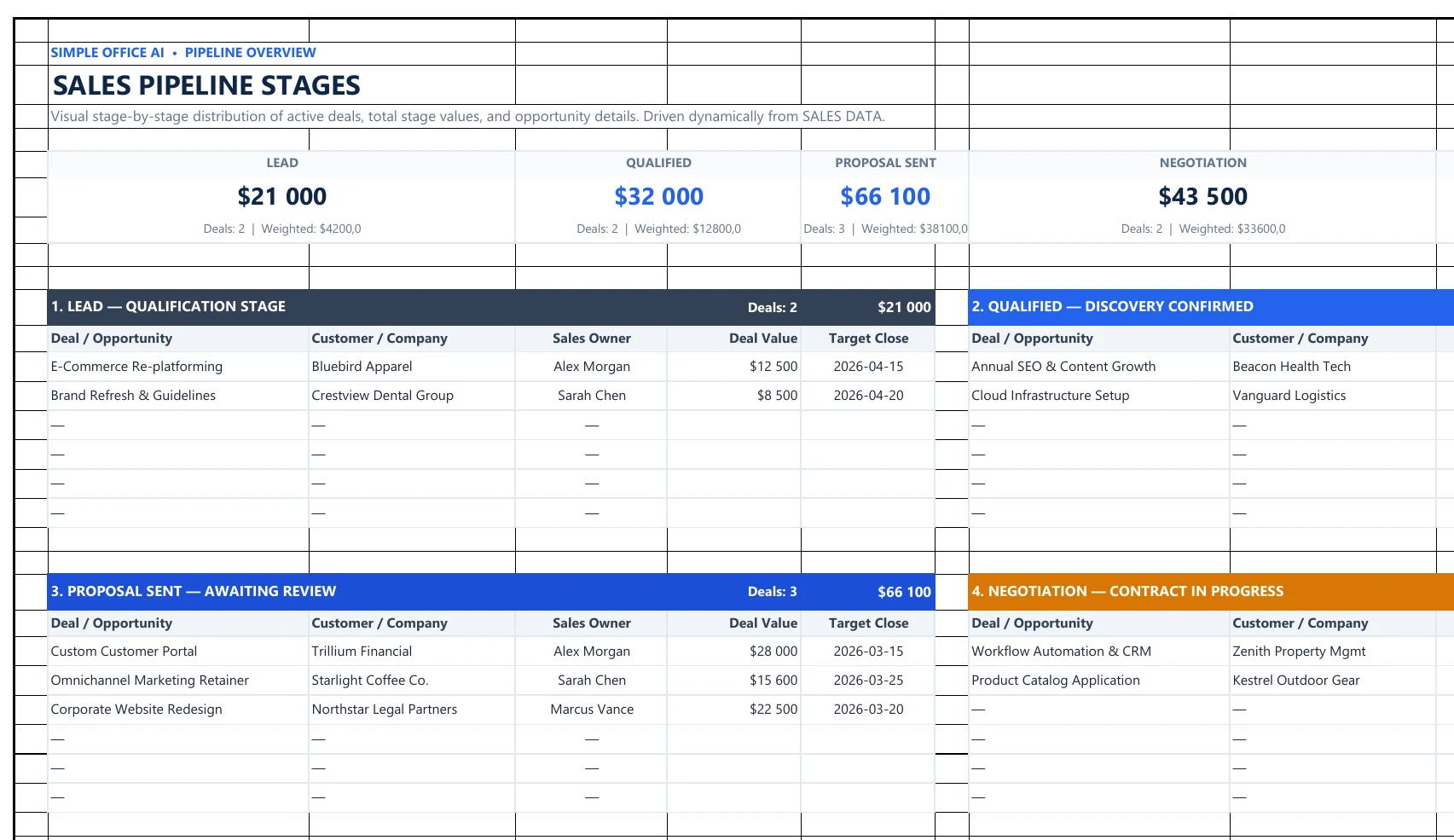
You do not need to enter the same deal again on this sheet. Update its stage in SALES DATA and use the pipeline as an overview of where opportunities stand.
3. Check the dashboard
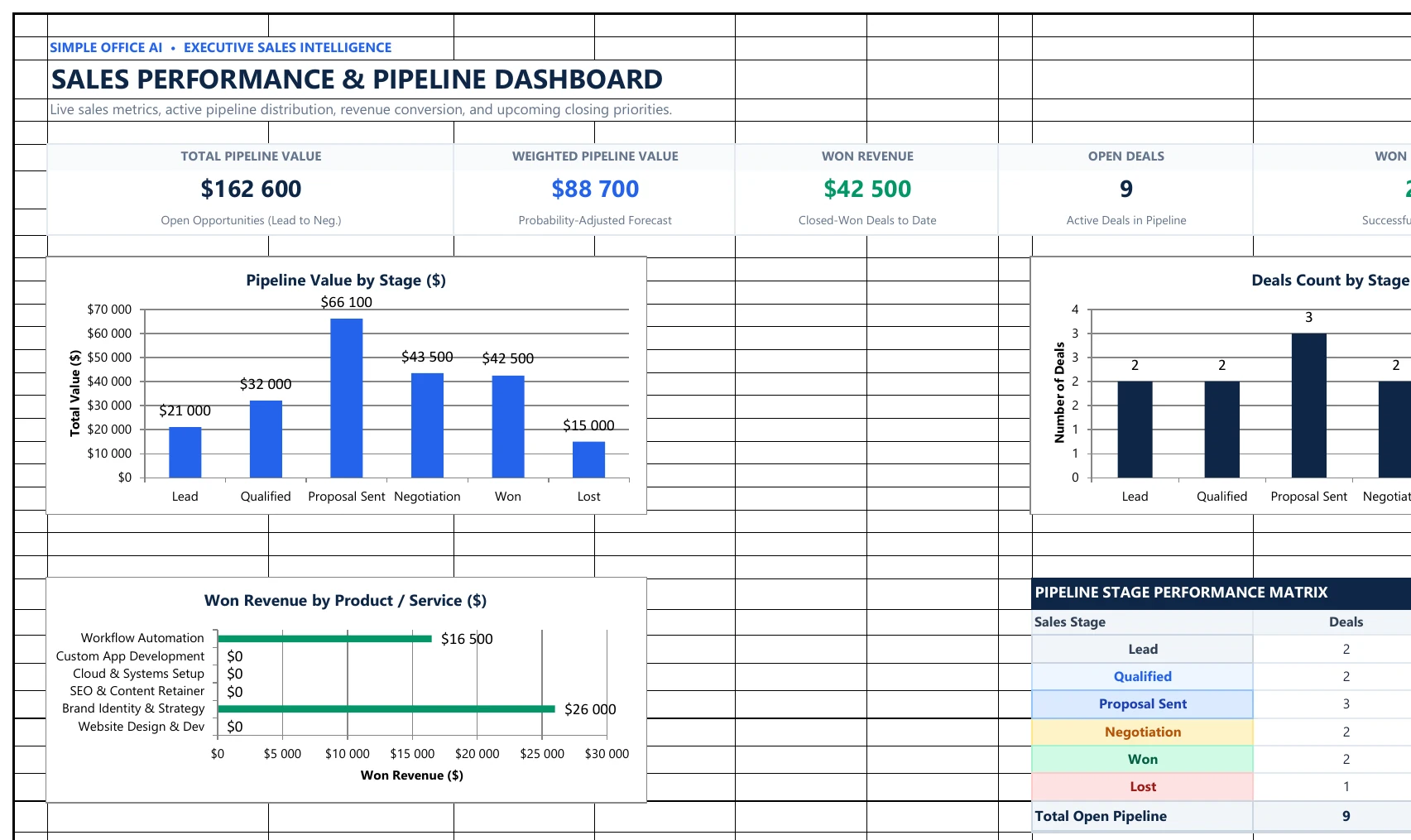
The dashboard brings the main sales numbers into one view. It tracks total open pipeline value, weighted open pipeline value, won revenue, open deals, won deals, and win rate. It also includes charts for pipeline value by stage, deals by stage, and won revenue by product or service, plus sections for upcoming closes and recent wins.
What the dashboard numbers mean
| Metric | What it shows |
|---|---|
| Total Pipeline Value | Total value of deals in Lead, Qualified, Proposal Sent, and Negotiation. |
| Weighted Pipeline Value | Open deal value adjusted by the probability entered for each opportunity. |
| Won Revenue | Total deal value for opportunities marked Won. |
| Open Deals | Number of opportunities still in an open sales stage. |
| Won Deals | Number of opportunities marked Won. |
| Win Rate | Won deals divided by Won + Lost deals. |
The sample data is there to show how the workbook behaves. In the included example, the dashboard shows $162,600 in open pipeline, $88,700 in weighted open pipeline, $42,500 in won revenue, 9 open deals, 2 won deals, and a 66.7% win rate. Replace the examples with your own opportunities before using those numbers for your business.
How to set up the template
- Make a copy of the Google Sheets version or download the Excel file.
- Open START HERE and review the six sales stages.
- Go to SALES DATA and replace the sample opportunities with your own deals.
- Enter a realistic probability for each open opportunity if you want to use weighted pipeline value.
- Update Sales Stage as each deal moves through your process.
- When a sale closes, mark it Won or Lost. For won deals, add the actual close date.
- Use SALES PIPELINE and DASHBOARD to review your open opportunities and results.
Sales tracker vs client tracker
A sales tracker and a client tracker solve different problems. This template focuses on opportunities before and at the point of sale: stage, deal value, probability, expected close date, and won revenue.
If you mainly need a place for client records, contact details, follow-ups, and client status, use our Client Tracker Spreadsheet in Google Sheets instead.
Sales tracker vs sales forecast
This tracker follows individual sales opportunities through a pipeline. A sales forecast is better when the main job is estimating future sales by period, product, or expected demand. If that is what you need, see our Sales Forecast Template in Excel.
When a spreadsheet is enough
This template is designed for a small, manageable pipeline where a spreadsheet is still easy to maintain. It gives you one sales table, a stage view, and a dashboard without adding a larger CRM system.
If several people need more advanced permissions, automated activity capture, email syncing, complex reporting, or a much larger sales database, a dedicated CRM may be a better fit. The spreadsheet is most useful when the goal is to keep a simple sales process visible and consistent.
Download the free sales tracker
Use the Google Sheets copy if you want to work online and share the tracker with your team. Use the Excel version if you prefer a local workbook.
Need a tracker changed for your own workflow? Contact Simple Office AI for help with spreadsheet cleanup or a custom admin system.
Frequently asked questions
Can I use this sales tracker in Google Sheets?
Yes. Use the Google Sheets button to create your own copy, then replace the sample opportunities with your sales data.
Is there an Excel version?
Yes. The original .xlsx workbook is available as a direct download.
What is weighted pipeline value?
It is the deal value multiplied by the probability entered for that opportunity. It gives you a probability-adjusted view of the open pipeline, but it is still an estimate rather than guaranteed revenue.
Which deals count as open pipeline?
The template treats Lead, Qualified, Proposal Sent, and Negotiation as open stages. Won and Lost are closed stages.
Can I change the sales stages?
The provided workbook is set up around six stages. If you change the stage structure, you should also check the dropdowns, pipeline formulas, dashboard formulas, and charts so they continue to match.
Is this a full CRM?
No. It is a focused sales tracker for deals, pipeline stages, values, close dates, and sales results. It does not try to replace a full CRM platform.