

A roadmap is useful when you need to see several business projects at the same time without turning every project into a long task list. This free Google Sheets roadmap template gives you one place to record initiatives, owners, priorities, status, dates, milestones, and notes, then turns that data into a monthly roadmap and a simple summary dashboard.
The template is designed for freelancers, solo workers, small service businesses, and small teams. It works best for high-level initiatives such as launching a website, improving client onboarding, automating invoice reminders, or updating service packages.
To start: sign in to Google to save your own Sheets copy. Read START HERE, enter one initiative in ROADMAP DATA, and review it in ROADMAP VIEW and SUMMARY before replacing the rest of the sample projects.
What the roadmap template includes
The workbook has four sheets: START HERE, ROADMAP DATA, ROADMAP VIEW, and SUMMARY. You enter project information once in ROADMAP DATA. The other views use that information to give you a clearer picture of the year.
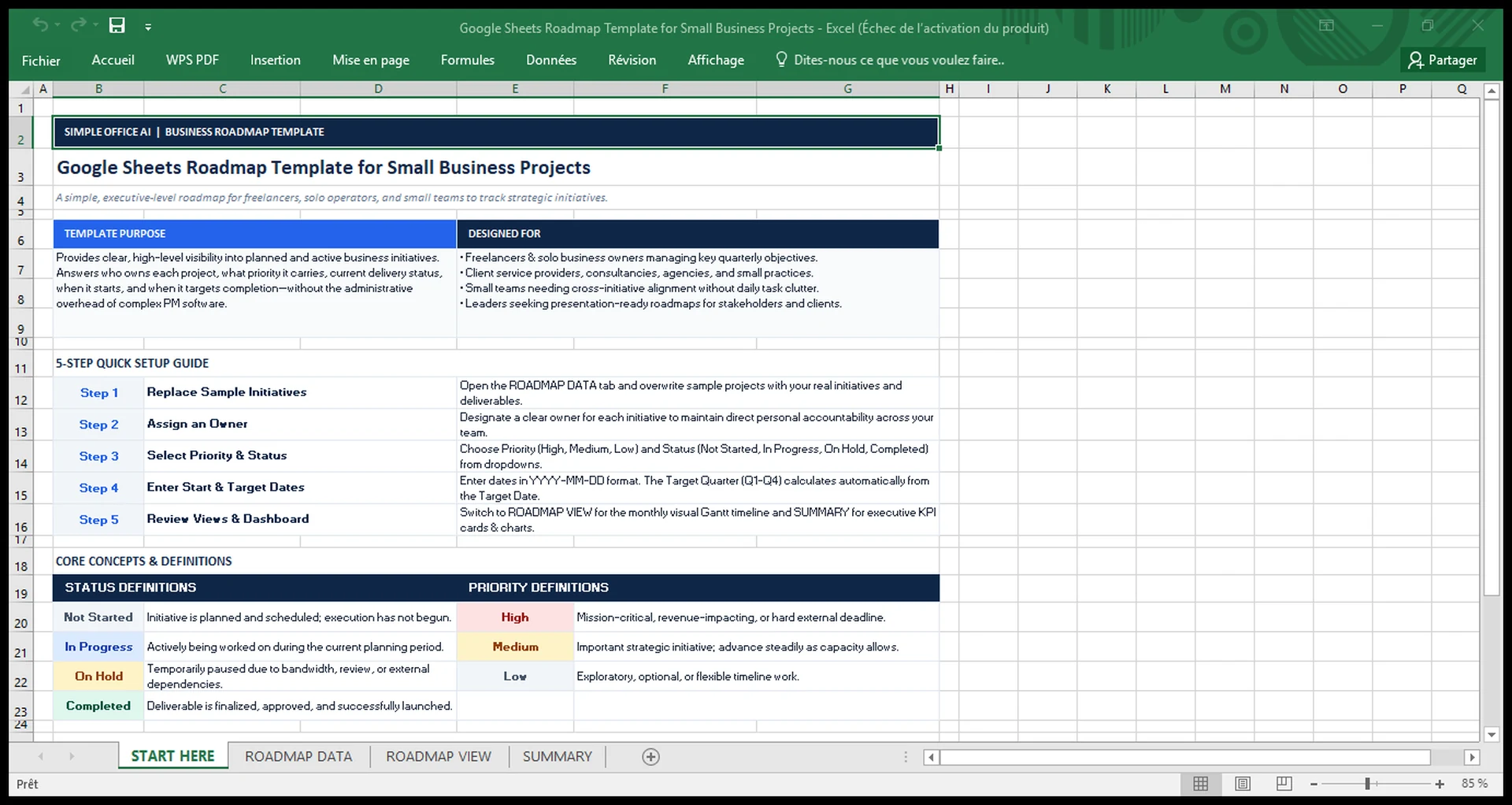
1. START HERE
The first sheet explains how to use the workbook. It includes a five-step setup guide and simple definitions for the Priority and Status fields. This is useful when more than one person will update the roadmap.
2. ROADMAP DATA
This is the main input sheet. Each row represents one initiative or project. The template includes these fields:
| Field | What to enter |
|---|---|
| Initiative ID | A short reference such as INIT-01 |
| Initiative / Project | The name of the project or business initiative |
| Goal / Deliverable | The result you want the initiative to produce |
| Owner | The person responsible for moving it forward |
| Priority | High, Medium, or Low |
| Status | Not Started, In Progress, On Hold, or Completed |
| Start Date | When work is expected to begin |
| Target Date | The planned completion date |
| Quarter | Calculated automatically from the target date |
| Milestone | An important checkpoint or output |
| Notes | Dependencies, context, or other useful information |
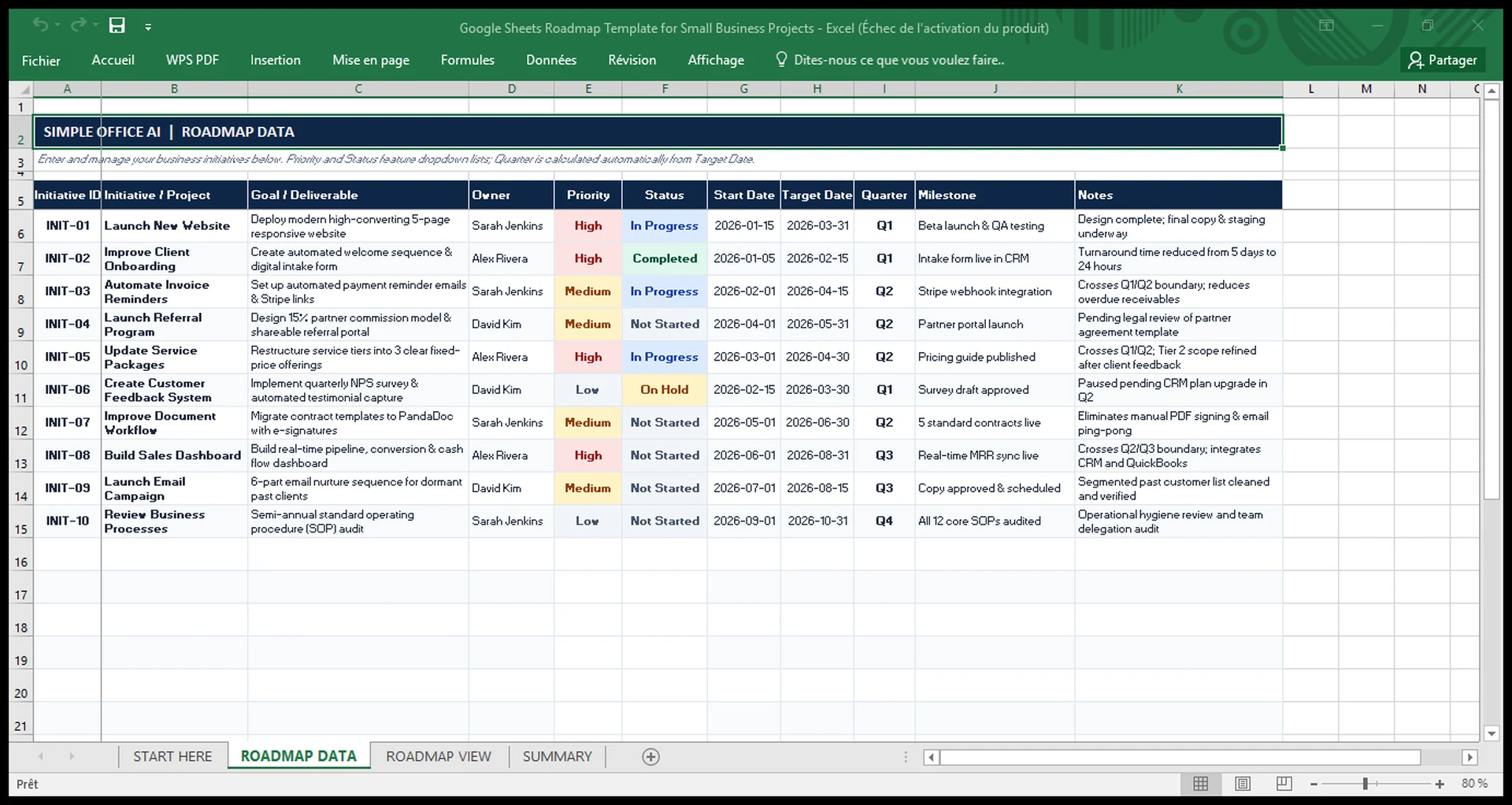
Priority and Status use dropdowns to keep entries consistent. The Quarter field is calculated automatically from the Target Date. Blank target dates stay blank instead of showing a formula error.
3. ROADMAP VIEW
The ROADMAP VIEW turns the project data into a monthly annual roadmap. The left side keeps the main project details visible. The right side shows January through December, grouped by quarter.
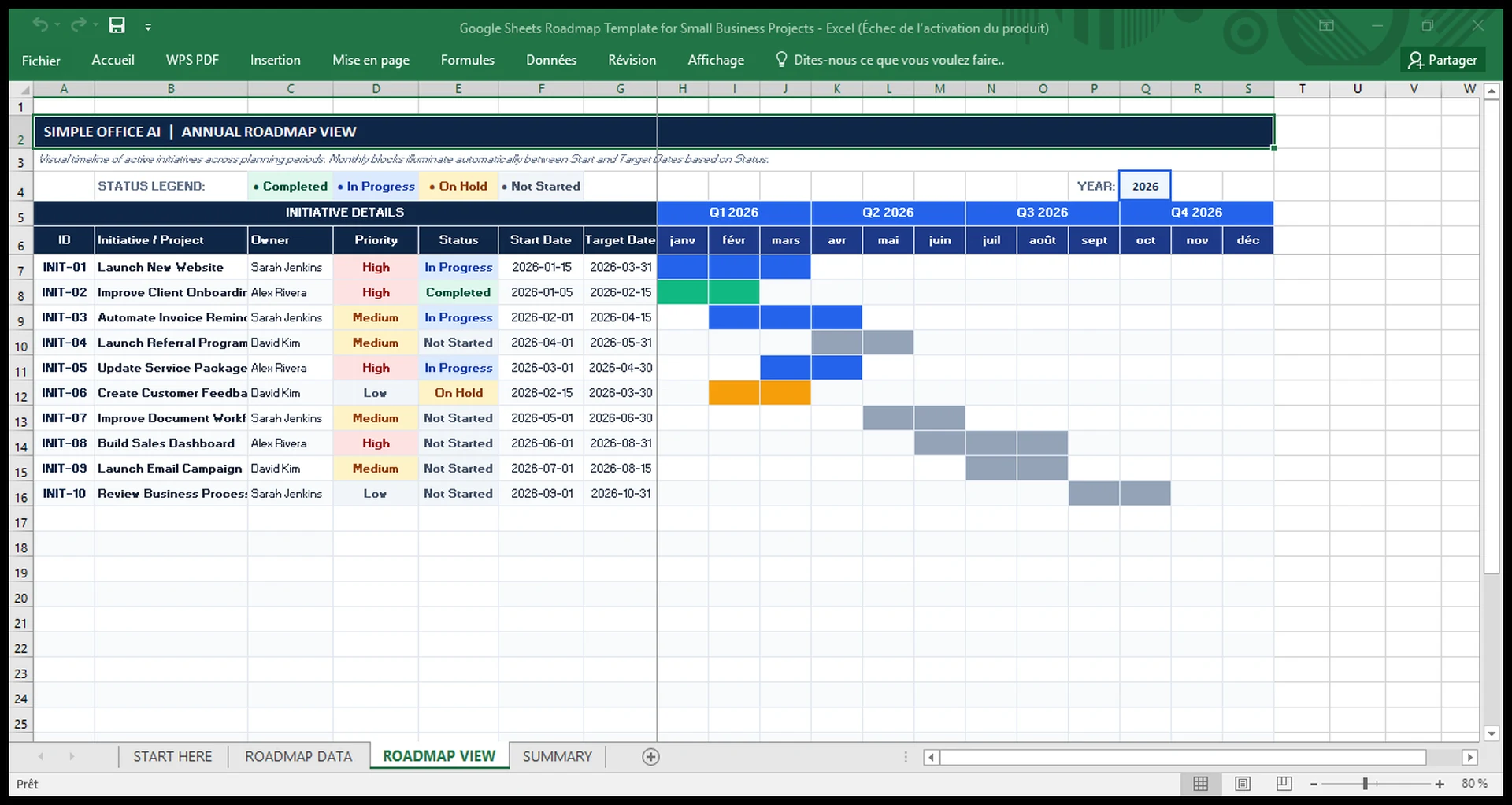
When an initiative has a valid start and target date, the active months are highlighted automatically. The color follows the project status: Completed, In Progress, On Hold, or Not Started. If the dates change, the monthly blocks move with them.
The view also has a year control. The current sample workbook is set to 2026, and the quarter headers follow the selected roadmap year.
4. SUMMARY
The SUMMARY sheet gives you a quick portfolio view. It counts total initiatives, Not Started, In Progress, On Hold, Completed, and High Priority projects. It also includes status and priority charts plus a focused list of active initiatives.
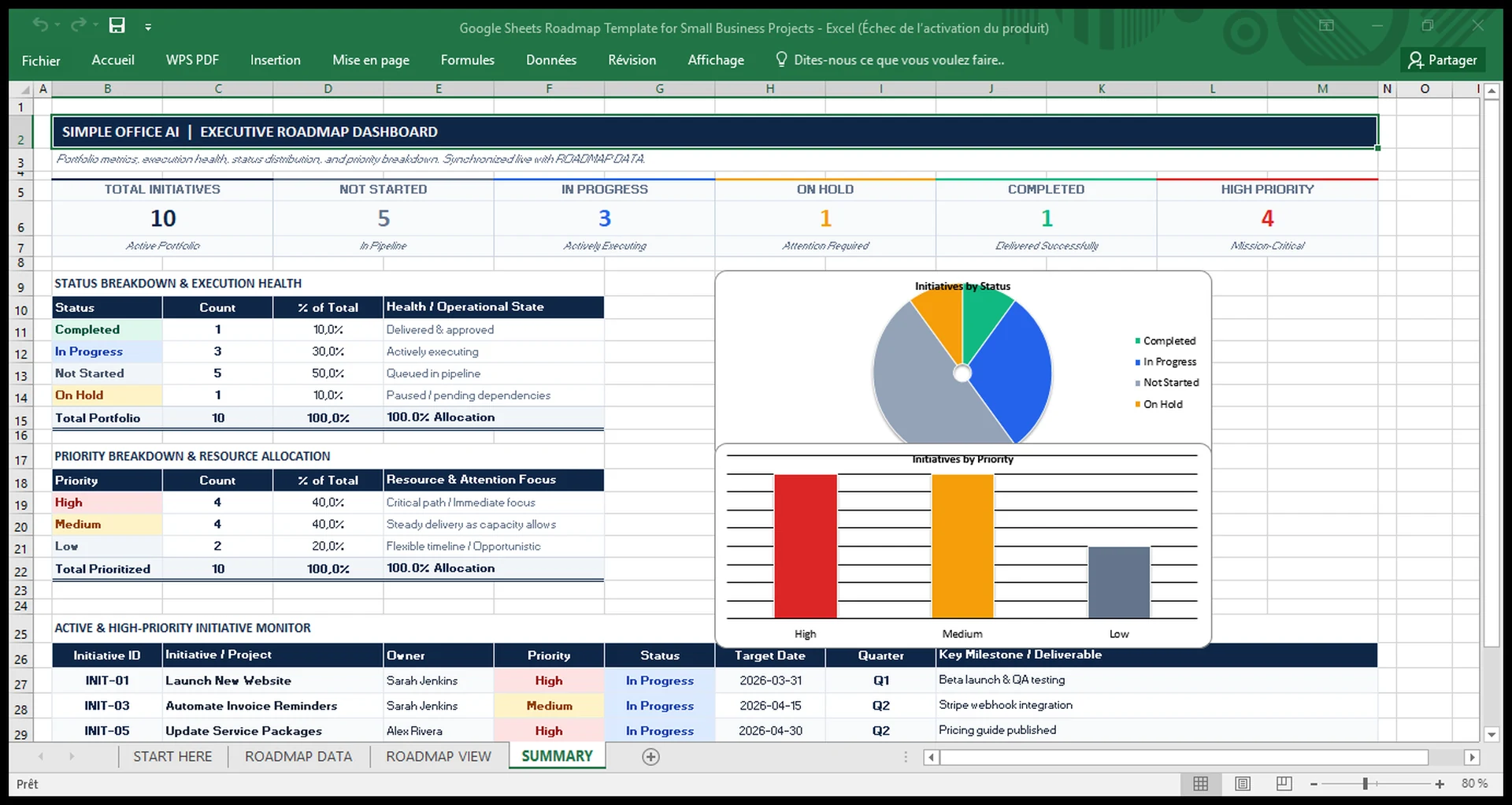
The dashboard is meant for a quick review. The detailed information still stays in ROADMAP DATA.
How to use the Google Sheets roadmap template
Step 1: Replace the sample initiatives
Open ROADMAP DATA and replace the example projects with your own. Keep each row at the initiative level. For example, use “Launch New Website” rather than adding every design, copy, and testing task as a separate roadmap item.
Step 2: Assign an owner
Add the person responsible for each initiative. For a solo business, this may simply be your own name. For a small team, it makes the roadmap easier to review because each initiative has a clear owner.
Step 3: Set priority and status
Choose High, Medium, or Low from the Priority dropdown. Then select Not Started, In Progress, On Hold, or Completed. Use the same definitions across the team so the dashboard remains meaningful.
Step 4: Enter start and target dates
Add the planned start and target dates. The Quarter field updates from the target date, and the annual roadmap uses the date range to highlight the active months.
Step 5: Review the roadmap and summary
Open ROADMAP VIEW to see how initiatives overlap across the year. Then use SUMMARY to check how many projects are active, waiting, completed, or high priority. Update the data sheet when plans change rather than editing the visual roadmap manually.
Roadmap vs project timeline vs Kanban board
These tools solve different planning problems. A roadmap is best for seeing high-level initiatives across a longer planning period. A project timeline is better when you need more detailed scheduling. A Kanban board is useful when the main question is what work is waiting, active, or completed.
| Tool | Best for | Typical level |
|---|---|---|
| Roadmap | Seeing initiatives, priorities, ownership, status, and timing across months | High-level |
| Project timeline | Scheduling project work and milestones over time | Project-level |
| Kanban board | Following work through workflow stages | Task/workflow-level |
| Daily schedule | Planning what happens during a specific day | Daily execution |
If you need more detailed scheduling, see our project timeline template in Excel. For workflow-stage tracking, use the Kanban board template. You can also compare several planning formats in our Google Sheets project management templates guide.
When this template is a good fit
This roadmap works well when you manage a small number of meaningful initiatives and want a simple annual view. It is especially useful when project information is currently scattered across notes, messages, calendars, or separate spreadsheets.
It is not designed to replace detailed project-management software when you need task dependencies, time tracking, workload planning, permissions, automations, or large multi-team programs. In that case, the roadmap can still serve as a high-level planning layer while detailed execution happens elsewhere.
Template design and compatibility
The workbook uses standard spreadsheet formulas, dropdown validation, conditional formatting, and native charts. It does not require VBA, macros, Apps Script, external APIs, or paid add-ons.
Google Sheets is the primary platform. An Excel download is linked above as an alternative. Check formulas, dropdowns, dates, charts, and layout in your own copy before using that version; the presence of a download link does not guarantee identical behavior across spreadsheet applications.
FAQ
What is a Google Sheets roadmap template?
It is a spreadsheet used to organize high-level projects or initiatives across a planning period. This template combines project details with a monthly roadmap and summary dashboard.
Is this the same as a Gantt chart?
No. The ROADMAP VIEW uses monthly timeline blocks, but the workbook is intentionally simpler than a detailed Gantt system. It focuses on high-level initiatives rather than task dependencies and detailed scheduling.
Can I change the roadmap year?
Yes. The ROADMAP VIEW includes a year control, and the quarter and month structure follows that planning year. Your project dates should match the year you want to review.
Can I add more projects?
Yes. The workbook includes additional prepared rows below the sample initiatives. Add your project information in ROADMAP DATA and keep the same formulas, dropdowns, and formatting when extending the table further.
Can I use the template in Excel?
An Excel download is linked above. Google Sheets remains the primary version. Open a working copy and check its calculations and formatting before entering live project information.
What should I put in a business roadmap?
For a simple small-business roadmap, start with the initiative name, goal, owner, priority, status, start date, target date, and an important milestone. Add notes only when they help explain a dependency, risk, or decision.
Get the free roadmap template
Use the template as a starting point, replace the sample initiatives, and update it as your plans change.
If you need help turning scattered spreadsheets and admin work into a cleaner system, see our small-business spreadsheet and admin services.