

A business budget is useful only when you can compare the plan with what actually happened. This free Excel template gives you one place to set monthly income and expense targets, log actual transactions, and review budget vs actual performance across the year.
The workbook is built for freelancers, solo workers, small service businesses, and small teams. It is an operating budget, not a personal budget or a replacement for accounting or tax software.
What this small business budget spreadsheet includes
The workbook has five sheets: Start Here, Dashboard, Monthly Budget, Income, and Expenses. The included figures are fictional sample business data so you can see how the system works before replacing them with your own numbers.
- 12-month budgeted income
- 12-month budgeted operating expenses
- actual income and expense ledgers
- budget vs actual comparisons
- income and expense variance
- monthly and annual net results
- dashboard KPIs and charts
- category-level tracking
Download the free Excel budget template
Use the Excel workbook as your starting point, then replace the fictional sample business information with your own categories, targets, income, and expenses.
Make a Copy in Google SheetsCopy in Google Sheets
The workbook uses standard spreadsheet formulas and does not require VBA macros, Power Query, or external dependencies. Choose the Excel download or make your own Google Sheets copy above.
How to use the budget spreadsheet
1. Start with the setup sheet
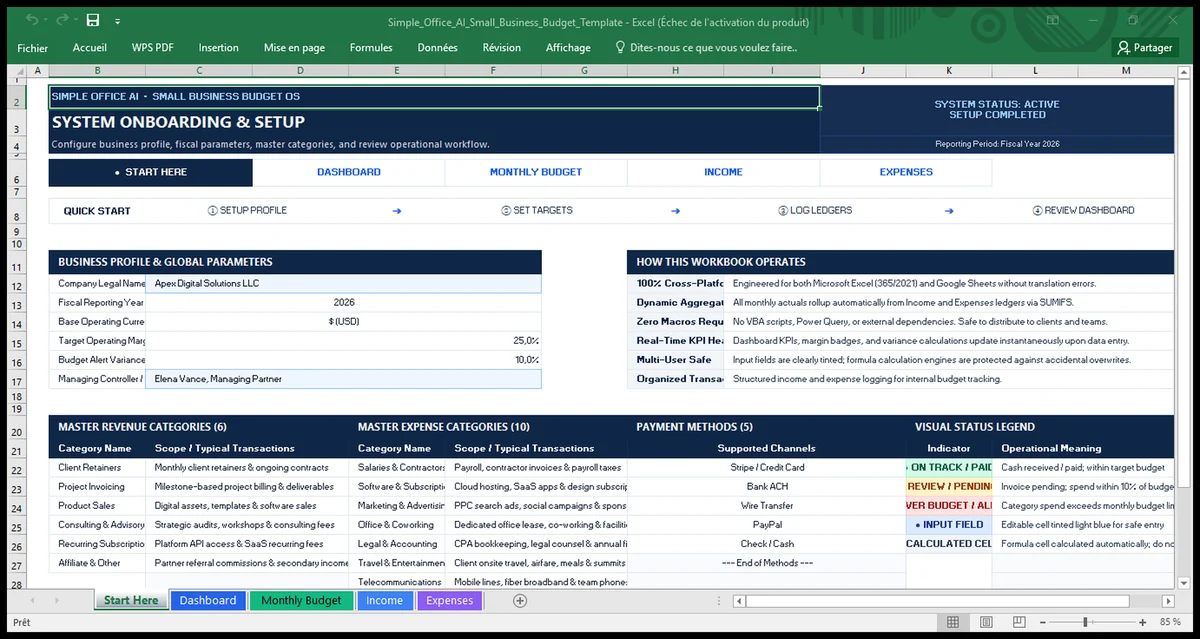
Open Start Here first. This sheet shows the workbook workflow, business profile fields, revenue categories, expense categories, payment methods, and the visual status legend.
Replace the fictional company information with your own business details. Review the categories before entering transactions so the same category names are used throughout the workbook.
2. Set your monthly income budget
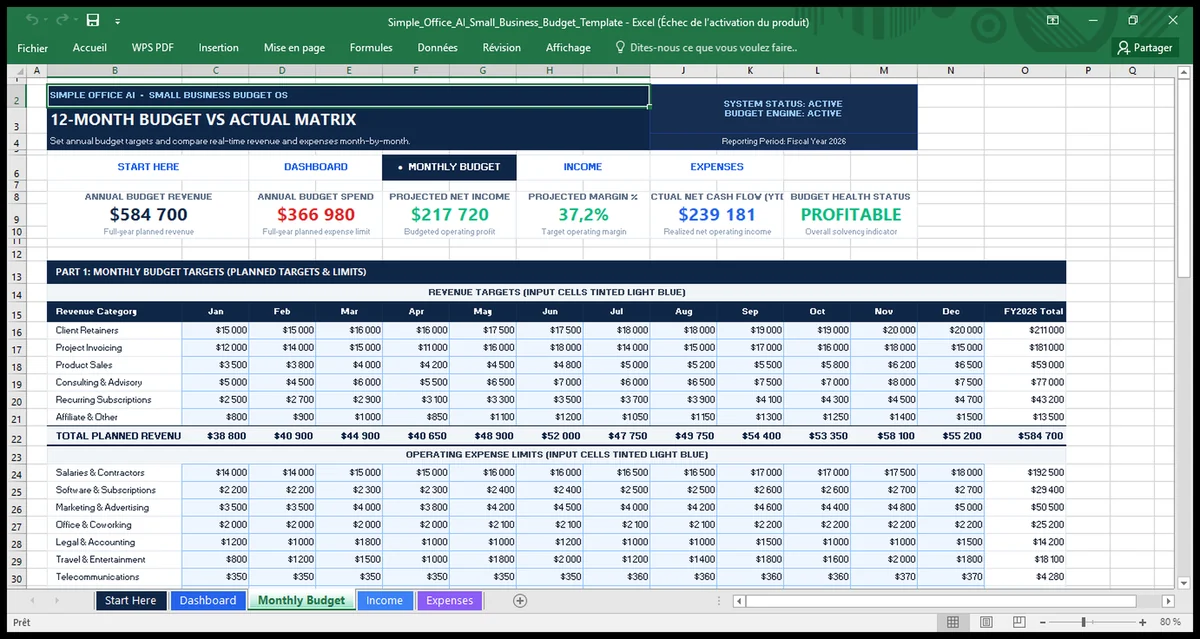
Go to Monthly Budget. The first section contains monthly revenue targets from January through December. Enter the amount you expect for each revenue category.
The sample workbook includes categories such as client retainers, project invoicing, product sales, consulting and advisory work, recurring subscriptions, and affiliate or other income. Change the amounts and categories to fit your business.
3. Set monthly expense limits
In the same Monthly Budget sheet, enter your planned operating expenses. The sample categories include salaries and contractors, software and subscriptions, marketing, office and coworking, legal and accounting, travel, telecommunications, utilities and equipment, insurance and taxes, and miscellaneous costs.
This creates the planned side of the budget before you begin comparing it with actual results.
4. Record actual income
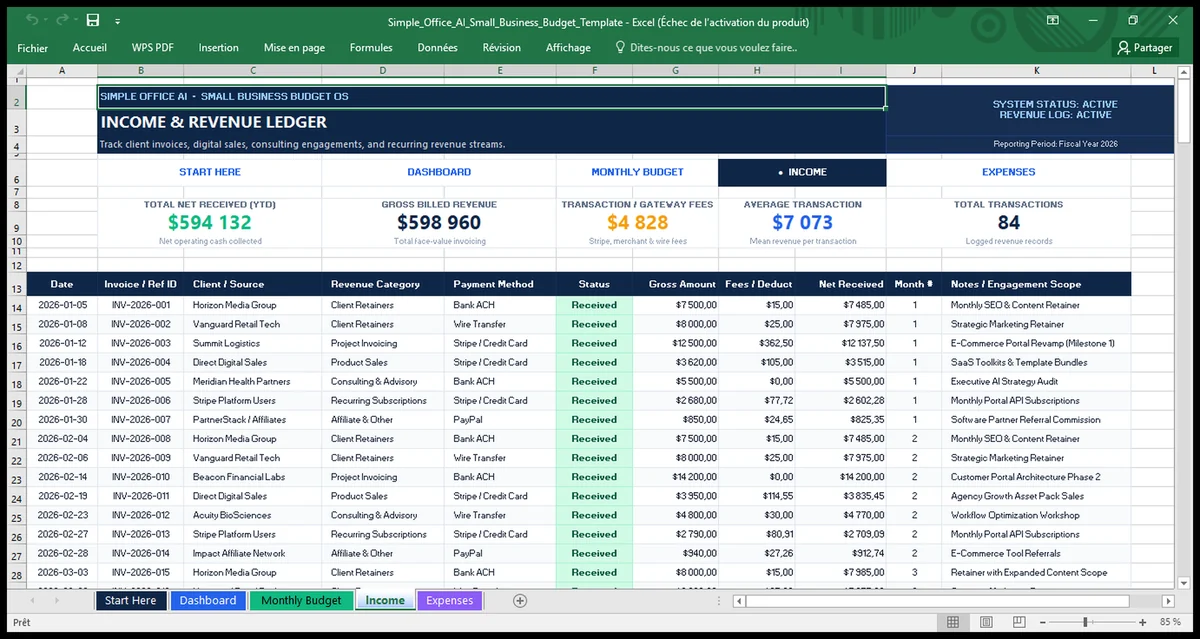
Use the Income sheet as the revenue ledger. Each row can record the date, reference ID, client or source, revenue category, payment method, status, gross amount, fees or deductions, net received, and notes.
Keep one transaction per row. Consistent category names are important because the workbook uses the ledgers to roll actual results into the monthly summaries.
5. Record actual expenses
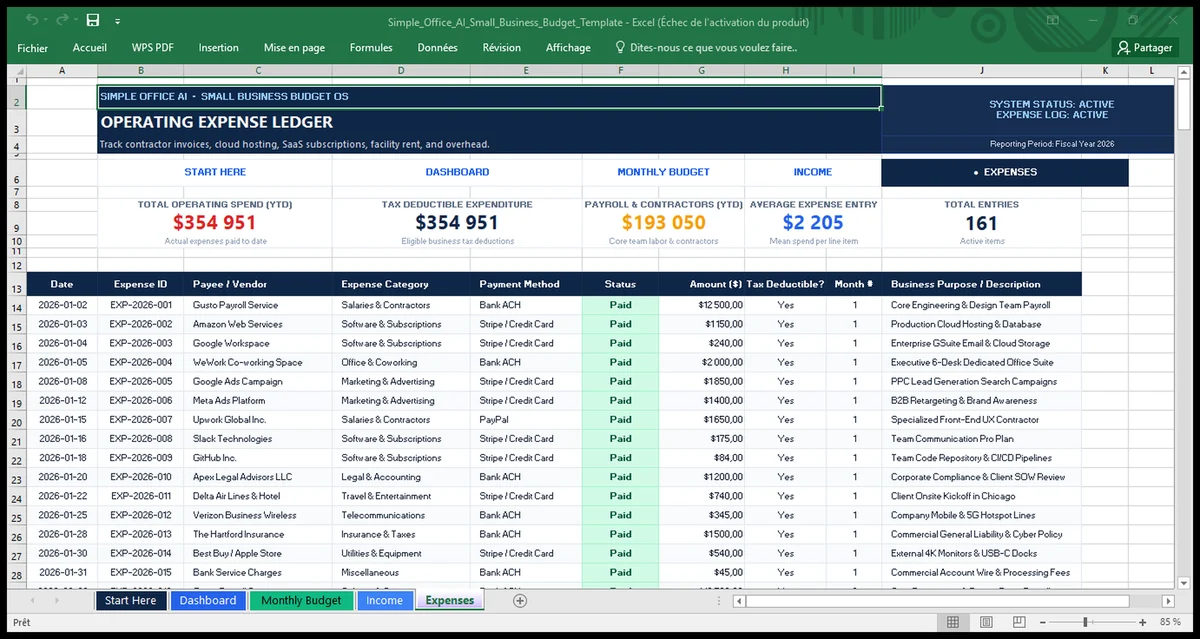
Use the Expenses sheet for operating costs. Each entry can include the date, expense ID, vendor, expense category, payment method, status, amount, a user-entered tax-deductible marker, and a short business-purpose description.
The tax-deductible field is an internal tracking field. Whether an expense is deductible depends on your situation and applicable tax rules, so do not treat the spreadsheet as tax advice.
6. Compare budget vs actual
Return to Monthly Budget after you add transactions. The workbook brings actual revenue and expense data into the monthly comparison area so you can compare your plan with recorded results.
Use the variance figures as a signal to investigate. A difference is not automatically good or bad. For example, lower spending can mean cost control, but it can also mean that a planned activity did not happen.
7. Review the dashboard
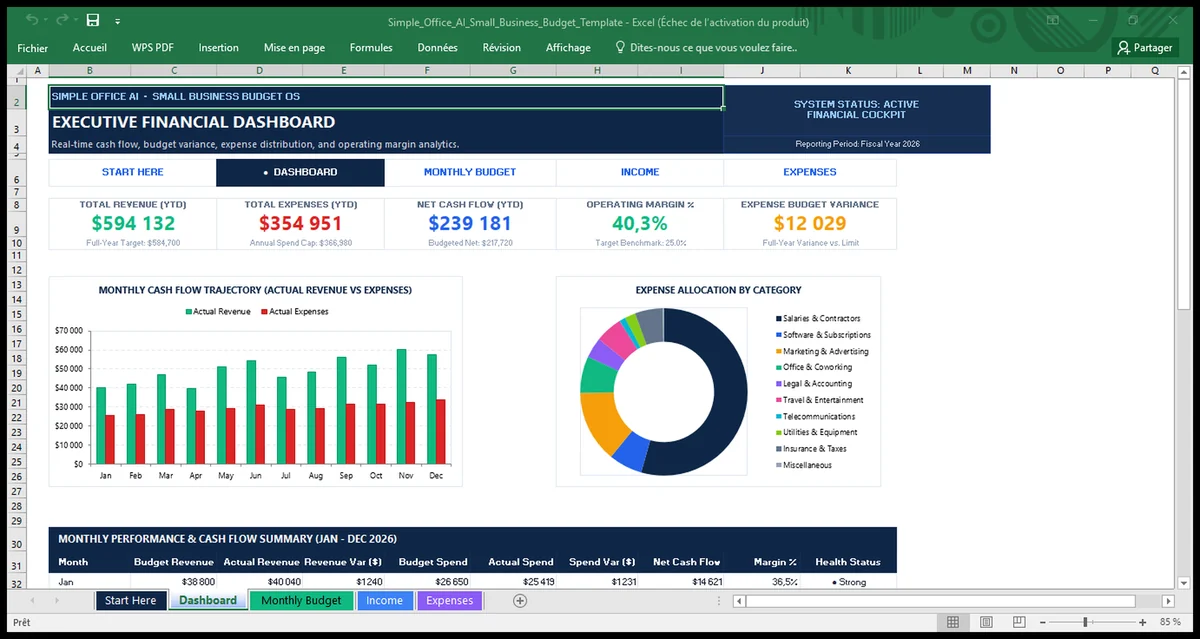
The Dashboard gives you a faster summary of the workbook. It shows revenue, expenses, net cash flow, operating margin, budget variance, a monthly revenue-versus-expense chart, an expense allocation chart, and a monthly performance table.
Use it for a quick monthly review, then return to the underlying budget or ledger when you need to understand a number in more detail.
How to read budget variance
Budget variance is the difference between what you planned and what happened. For income, compare actual revenue with the revenue target. For expenses, compare actual spending with the planned limit.
Do not look at variance in isolation. Check the category and the reason behind the difference. A large marketing overspend, for example, means something different from a one-time equipment purchase or a lower-than-planned contractor bill.
Budget spreadsheet vs expense tracker
A budget spreadsheet and an expense tracker solve different problems. A budget starts with a plan for expected income and spending, then compares that plan with actual results. An expense tracker mainly records what you already spent.
If your main need is recording business expenses rather than planning a full operating budget, use the Google Sheets Expense Tracker for Small Business. For employee or business expense reporting and reimbursement records, see the Small Business Expense Report Template for Excel.
Budget spreadsheet vs sales forecast
A sales forecast focuses on expected sales or revenue. A business budget is broader because it brings planned income and planned expenses together and compares both with actual results.
If you need a dedicated revenue forecasting tool, use the Sales Forecast Template in Excel for Small Business.
When is a spreadsheet enough?
A spreadsheet can be enough when the business has a manageable number of transactions, a small number of people maintaining the file, and a straightforward monthly budgeting process. It also works well when you want a flexible planning tool without adding another software subscription.
Consider dedicated accounting or budgeting software when you need features such as bank feeds, formal bookkeeping workflows, invoicing, reconciliation, stronger permissions, audit trails, or deeper multi-user controls. This template is for internal budget planning and tracking. It is not a full accounting system.
Simple monthly budget routine
- Set or review the next month’s income and expense targets.
- Keep the Income and Expenses ledgers current.
- Review budget vs actual results at month end.
- Investigate the largest useful variances.
- Adjust future targets when the underlying business assumptions have changed.
Frequently asked questions
What should be included in a small business budget?
A practical operating budget should include expected income, planned expenses, actual income, actual expenses, and a way to compare the plan with the results. Categories should reflect how your business actually earns and spends money.
What is the difference between a business budget and an expense tracker?
A business budget plans expected income and expenses before comparing them with actual performance. An expense tracker mainly records spending that has already happened.
How often should I update the spreadsheet?
Enter actual income and expenses often enough that the ledger stays reliable. For many small businesses, a weekly update plus a monthly budget review is a practical routine.
How do I compare budgeted and actual expenses?
Compare the planned amount for each category with the actual amount recorded for the same period. Then review the variance and the reason behind it instead of judging the number by itself.
Can I use this template for a service business?
Yes. The sample categories already include service-oriented revenue and operating costs, and you can adapt the categories and targets to your own business model.
Can I use this workbook in Google Sheets?
Yes. Use the Google Sheets copy option above, then choose Make a copy to save your own editable version.